Note
Go to the end to download the full example code.
Connecting multiple SFGs
It is sometimes useful to create several SFGs and later on connect them. One reason is using the SFG generators.
Although connecting several SFGs is rather straightforward, it is also of
interest to “flatten” the SFGs, i.e., get a resulting SFG not containing other
SFGs but the operations of these. To do this, one will have to use the
method connect_external_signals_to_components().
This example illustrates how it can be done.
from b_asic.sfg_generators import wdf_allpass
from b_asic.sfg import SFG
from b_asic.special_operations import Input, Output

# Generate allpass branches for fifth-ordet LWDF filter
allpass1 = wdf_allpass([0.2, 0.5])
allpass2 = wdf_allpass([-0.5, 0.2, 0.5])

in_lwdf = Input()
allpass1 <<= in_lwdf
allpass2 <<= in_lwdf
out_lwdf = Output((allpass1 + allpass2) * 0.5)

# Create SFG of LWDF with two internal SFGs
sfg_with_sfgs = SFG(
    [in_lwdf], [out_lwdf], name="LWDF with separate internals SFGs for allpass branches"
)
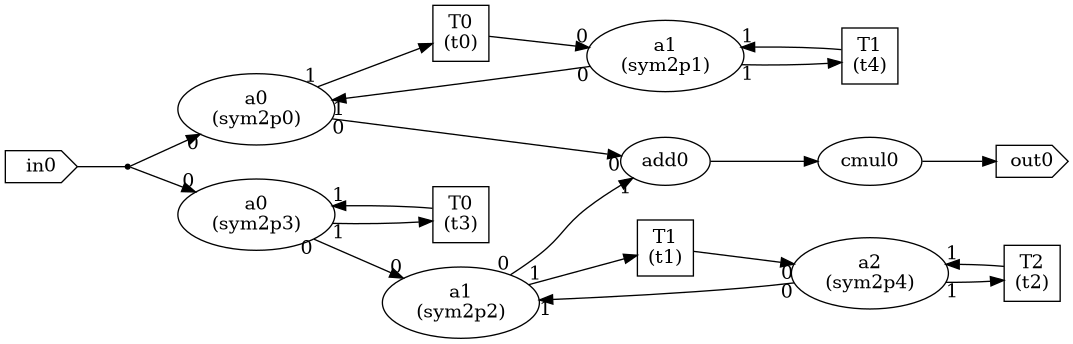
The resulting SFG looks like:
sfg_with_sfgs

Now, to create a LWDF where the SFGs are flattened. Note that the original SFGs
allpass1 and allpass2 currently cannot be printed etc after this operation.
allpass1.connect_external_signals_to_components()
allpass2.connect_external_signals_to_components()
flattened_sfg = SFG([in_lwdf], [out_lwdf], name="Flattened LWDF")

Resulting in:
flattened_sfg
Total running time of the script: (0 minutes 0.081 seconds)